In the rapidly evolving world of 2025, you no longer need a multimillion-dollar budget or a film crew to create broadcast-quality commercials. With the release of Nano Banana Pro (powered by Gemini 3 Pro Image) and Kling AI 2.5, you can now create a hyper-realistic, emotionally resonant cinematic AI ad from your bedroom.
In this guide, we break down the exact workflow used to create a cinematic AI ad for Nike featuring legends like LeBron James, Cristiano Ronaldo, and Serena Williams. From storyboarding to complex object morphing, here is how you can master cinematic AI advertising.
The Tech Stack
To achieve “Super Bowl commercial” quality, you need tools that handle consistency, texture, and motion physics perfectly.
- Visuals: Nano Banana Pro (accessed via Higgsfield or Gemini). Known for its “Thinking” process, it offers 14-image context windows and insane prompt adherence.
- Animation: Kling AI 2.5 Turbo. The current king of realistic motion and start/end frame control.
- Scripting: ChatGPT (or any LLM) for shot lists and prompting logic.
Step 1: The “Golden” Storyboard
Great ads start with a story, not a prompt. For a sports commercial, you need intensity, iconic moments, and a thread that ties them together.
The Concept: We selected three icons—LeBron (Basketball), Ronaldo (Football), and Serena (Tennis). To make the ad cohesive, we used a visual anchor: the ball. The transition of a basketball morphing into a football, and then a tennis ball, creates a seamless narrative flow.
De Workflow:
- Brainstorm: Identify the unique “ticks” of your characters (LeBron’s chalk toss/scream, Ronaldo’s “Siu” breathing, Serena’s serve).
- LLM Refinement: Feed your rough ideas into ChatGPT. Ask it to break the concept into specific camera shots (e.g., “Extreme close-up on eyes,” “Low angle body shot”).
- Visualization: Use these text descriptions to build your image prompts.
Step 2: Generating Hyper-Realistic Visuals
We use Nano Banana Pro for the base images because of its ability to render skin texture, sweat, and lighting with terrifying realism.
The “Hero” Shot Prompting Strategy
You don’t just ask for “LeBron James.” You must act as the Director of Photography. Define the camera, the lens, and the lighting.
Example Prompt for LeBron:
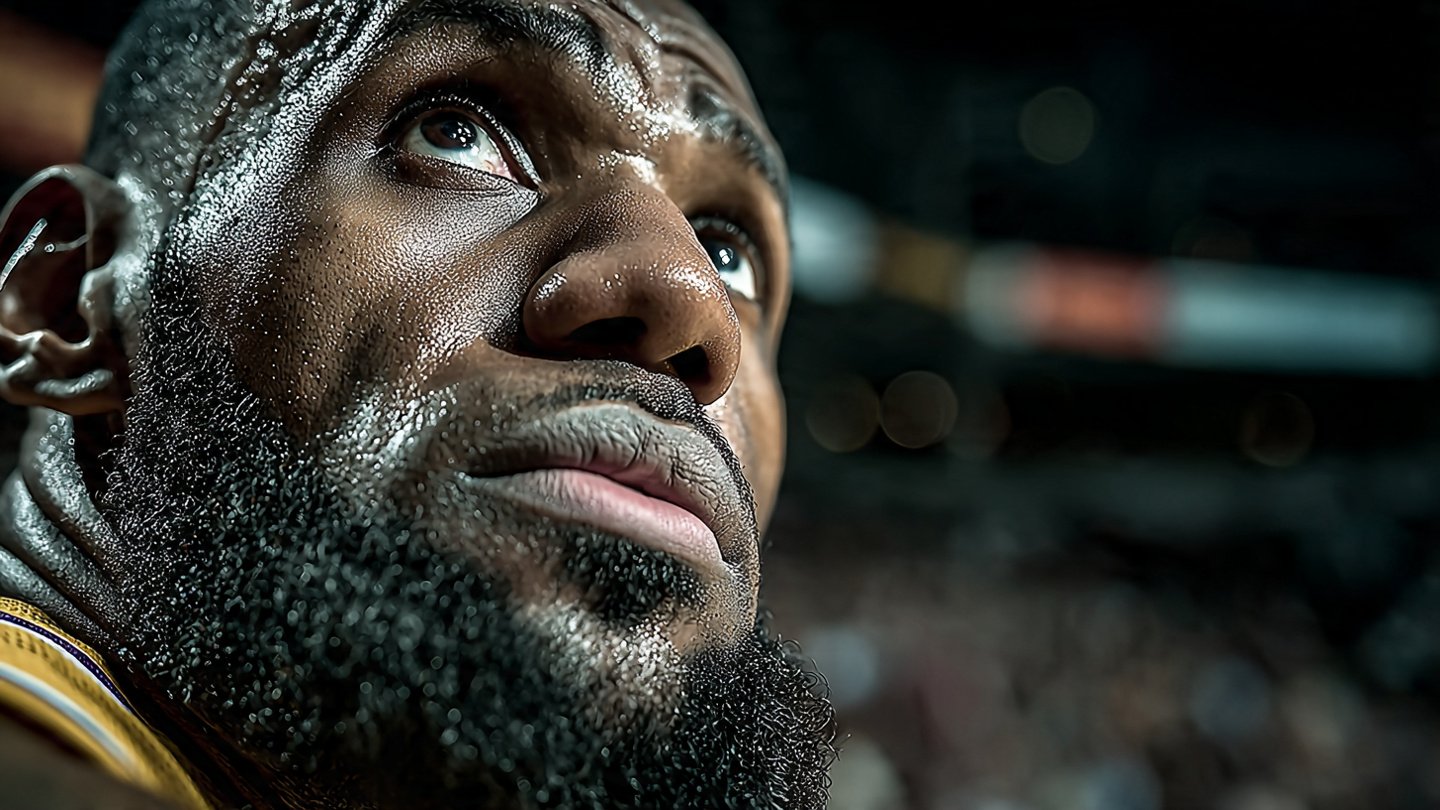
“A dramatic front angle portrait of LeBron James during a focused free throw. He’s wearing the yellow Lakers jersey. His eyes are locked on the arena lights… Shot on Sony A7R, rich bokeh, crisp facial detail, dark moody aesthetic, deep contrast.”
Why this works:
- Hardware specifics: Mentioning “Sony A7R” and “Rich Bokeh” forces the AI to mimic high-end photography physics.
- Details: Nano Banana Pro picks up on “sweat glistening” and “pores,” adding the grit needed for a sports ad.
Achieving Consistency
For the close-ups (eyes, hands, ball), use your first generated “Hero” image as a Reference Image in the prompt bar. This ensures the skin tone, lighting, and jersey color remain identical across different angles.
Do the same for the images of Ronaldo and Serana Williams.
Step 3: Cinematic Animation with Kling AI
Once you have your stills, it’s time to bring them to life. We categorize animations into three difficulty levels.
The “Micro-Movement” (Close-ups) – Level 1
- Subject: Eyes, sweating, breathing.
- Technique: Import your still image into Kling AI as the Start Frame.
- Prompt: “Focused eyes blinking once, looking at the same spot. Sweat dripping down from one eye. Subtle skin shimmer. Camera almost still with slight handheld motion.”
- Result: A hyper-realistic, intense portrait that feels alive without requiring complex physics.
“Action” Shot (Body Movement) – Level 2
- Subject: Shooting the ball, serving.
- Technique: Use text prompts to guide the physics.
- Prompt: “Animate the player lifting the ball slightly higher and releasing it in a smooth, controlled shooting motion.”
- Pro Tip: If the AI struggles with complex movements (like a full soccer kick), try “reverse” prompting. Generate the character walking backwards to their mark, or focusing before the shot. Sometimes the anticipation is more powerful than the action.
The “Morph” Transition (Expert) – Level 3
This is the secret sauce of high-end AI ads. You want the basketball to transform into a football seamlessly.
- Technique: Use Start and End Frames.
- Start Frame: Close-up of the Basketball in LeBron’s hands.
- End Frame: Close-up of the Football at Ronaldo’s feet.
- Prompt: “The camera follows the ball, keeping it centered. The basketball smoothly morphs into a football while maintaining momentum. Do not move left or right.”
- Why it works: Kling AI interpolates the pixels between the two sports, creating a magical transition that glues your separate scenes together.
Step 4: Final Assembly
Combine your clips in an editor (Premiere, Final Cut, or CapCut).
- Pacing: Match the cuts to the beat of an intense track.
- Sound Design: Add “swoosh” sounds for the ball transitions, crowd noise for the wide shots, and heavy breathing for the close-ups.
- Color Grade: Since Nano Banana Pro already provided a “moody aesthetic,” minimal grading is needed, but ensure contrast levels match between the three athletes.
Conclusion: The Era of Solo Ad Agencies
The combination of Nano Banana Pro for texture and Kling AI for motion has lowered the barrier to entry for high-end commercial work effectively to zero. Whether you are promoting a shoe brand, a personal project, or a local business, this workflow allows you to tell stories that were previously impossible without a studio budget. Now you can ‘literally‘ create a cinematic AI ad from your bedroom.
Ready to start? Head over to Higgsfield to access these tools, and don’t forget to join the community to share your prompts and learn from other creators.